
Hotel GM Scorecard & Dashboard
GM Hotel Scorecard Dashboard
One Excel workbook that turns your daily hotel numbers into a management report you can read in minutes. Enter your figures on a single sheet, and the dashboard automatically presents occupancy, revenue, profit, guest satisfaction, online reputation, and your standing against the competition. Built to work for properties from one star to five stars.
Download Link Below
Purpose
This workbook serves as a daily control tool for General Managers, Revenue Managers, owners, and property management teams. It does four things:
- Brings every key performance indicator together on one page, so there is no need to open several separate reports.
- Compares actual results against budget, last year, and the benchmark target for your star level, with automatic status flags.
- Shows where your hotel stands against the competitive set through the MPI, ARI, and RGI indices, so you know whether you are leading the market or falling behind.
- Converts findings into movement through an action item log with owners, due dates, and priorities.
It suits the daily morning briefing, the weekly report to ownership, the monthly performance review, and the standardisation of reporting across a portfolio of properties.
What is inside the file
The workbook contains five sheets with clearly separated roles: a report sheet, an input sheet, a settings sheet, a user guide, and an ownership notice.
1. Dashboard sheet (the finished report, no typing required)
This sheet presents the results in a clean, visual layout:
- An automatic header showing the hotel name, General Manager, room count, currency, report date, star display, and the number of days elapsed for MTD and YTD.
- Five headline KPI cards covering Occupancy MTD, ADR MTD, RevPAR MTD, RevPAR Index (RGI), and the YTD Composite Score, each with its variance against budget and last year.
- A Daily Flash table of eleven indicators, namely Occupancy, ADR, RevPAR, Total Revenue, TRevPAR, GOPPAR, GOP Margin, CPOR, and RevPAR Rank, each shown for Last Night, MTD, and YTD alongside budget and last year comparisons.
- A Status vs Star Target panel that grades eight key indicators against the benchmark for your star level, marking each one On Track, Watch, or Action.
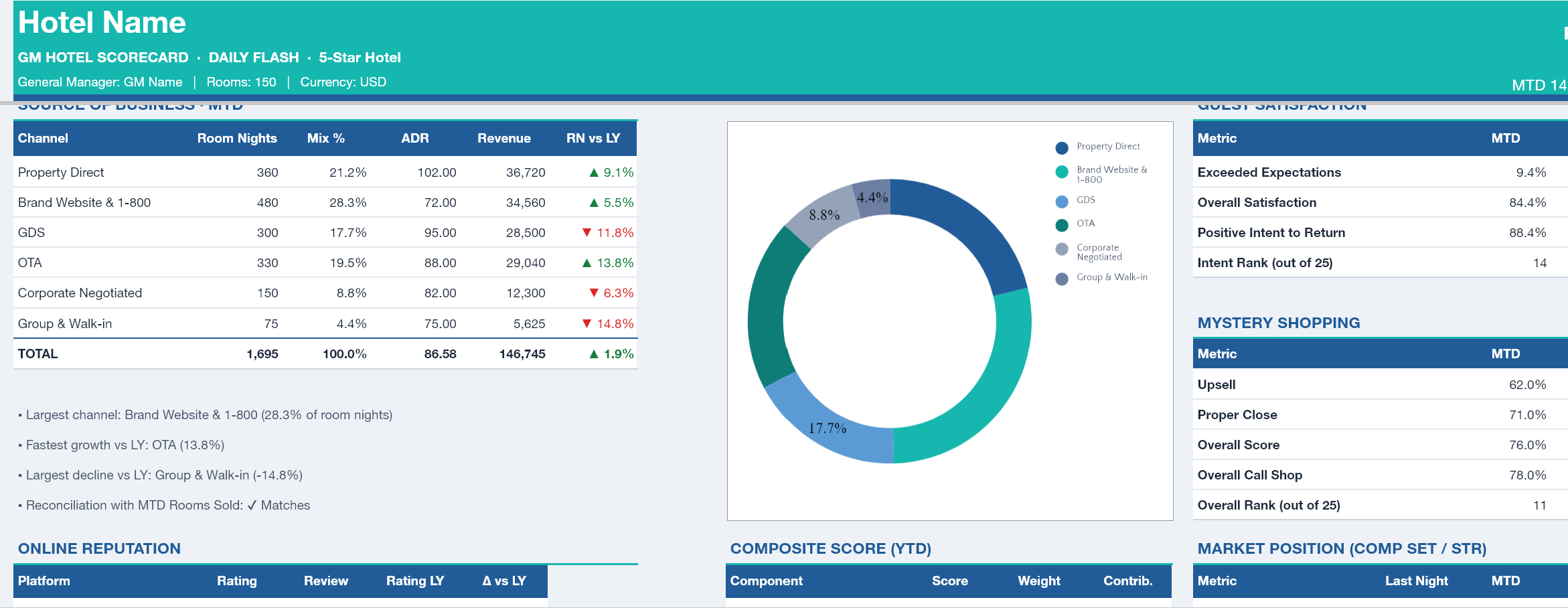
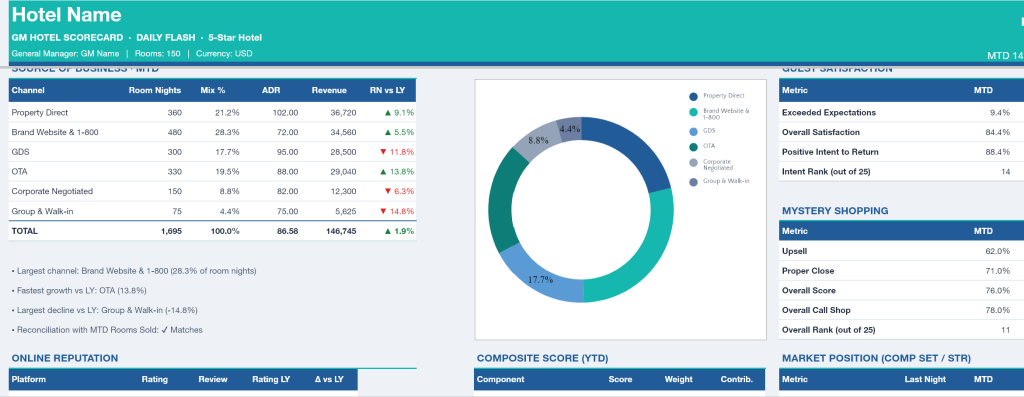
- A Source of Business panel for the month to date, mapping six booking channels with room nights, mix percentage, channel ADR, revenue, and growth against last year, plus three automatic summary lines naming the largest channel, the fastest growing channel, and the channel with the steepest decline.
- Guest Satisfaction, Mystery Shopping, and Online Reputation panels, each with a year on year comparison and your rank within the competitive set.
- A Market Position panel showing competitive set occupancy, ADR, and RevPAR, then calculating MPI, ARI, and RGI with an Ahead or Behind marker.
- A Composite Score panel that combines five scoring components into a single number with its rating.
- Two charts, one tracking RevPAR and occupancy across the last fourteen days, and one comparing RevPAR against budget and last year.
- A Forecast and Pace table for the next seven days covering rooms on the books, forecast rooms, the same point last year, rooms still available to sell, variance against the occupancy target, and estimated room revenue and RevPAR.
- An Action Items panel with a running count of total actions, completed actions, and high priority items still open.
2. Data sheet (the only place you enter figures)
Ten structured sections, with input cells visually separated from formula cells:
- Daily Flash, covering rooms sold, room revenue, F&B revenue, other revenue, and GOP for MTD, YTD, budget, and last year. Occupancy, ADR, RevPAR, TRevPAR, GOPPAR, GOP Margin, and CPOR are calculated for you.
- Source of Business, six channels you can rename to match your own distribution mix, including a reconciliation line that warns you when total channel room nights do not agree with rooms sold for the month to date.
- Guest Satisfaction, covering Exceeded Expectations, Overall Satisfaction, Positive Intent to Return, and your Intent to Return rank.
- Mystery Shopping, covering Upsell, Proper Close, Overall Score, Overall Call Shop, and your overall rank.
- Online Reputation, for four review platforms on a five point scale with review counts and last year ratings, producing a weighted average based on review volume.
- Market and Competitive Set, where you enter competitor occupancy and ADR from your STR report or your own rate survey, after which MPI, ARI, and RGI are calculated automatically.
- Daily Trend, fourteen rows of daily figures whose dates follow the report date automatically.
- Forecast and Pace, seven forward days covering rooms on the books, forecast rooms, and the same point last year.
- Action Items, five rows with columns for area, owner, due date, priority, and status, with ready made dropdown lists.
- Composite Score, fully automatic, calculating each component score and its contribution.
3. Setup sheet (a one time configuration)
- Hotel profile, covering property name, star rating from one to five, room count, currency label, report date, General Manager name, and the number of hotels in your competitive set.
- A benchmark table for every star level, holding targets for occupancy, ADR, RevPAR, guest satisfaction, intent to return, mystery shopping, GOP margin, and online rating. The workbook automatically selects the row matching your star rating, and every value remains editable so you can align it with ownership targets or STR data.
- Composite Score weightings across five components, namely Revenue, Guest Satisfaction, Mystery Shopping, Online Reputation, and Profitability, with a built in check confirming the weights total exactly one hundred percent.
- KPI status thresholds, which set how far an indicator may fall below target before it is flagged as Watch or Action.
4. How to Use sheet (the user guide)
A structured guide in eight parts, covering the workbook map, the meaning of each colour and symbol, the initial setup steps, how to complete every data section, a five step daily routine, a full glossary of every KPI with its formula, recommended areas of focus by star class, and a troubleshooting section for the most common issues.
5. Copyright sheet
An ownership and copyright notice covering the design, structure, and formulas within the workbook.
What you gain
- Daily reporting time drops sharply, since every calculation flows from a single round of data entry.
- Decisions come faster and with more direction, because each indicator already carries a status and a direction of travel.
- Reporting becomes consistent, which makes the format easy to roll out across several properties at once.
- It is ready for any class of hotel, as targets and benchmarks adjust to the star rating you select.
- No additional software is required, only Microsoft Excel or Google Sheets.
Download link :
Hotel GM Dashboard Scorecard