
F&B Daily Flash Cost Control
F&B Daily Flash Cost Control ( Dashboard Style)
Short description
A complete monthly food and beverage cost control workbook with one sheet per business day, compiled automatically into a month to date dashboard. It captures revenue by outlet, the full cost of sales calculation, direct purchases, and waste at cost, then reports food and beverage cost percentages against budget every single day rather than at month end.
Purpose
This workbook is designed as a preventive measurement for the Food and Beverage Director, the Food and Beverage Manager and the Executive Chef, as the daily basis for reporting F&B performance to the General Manager, with figures verified by the Finance Cost Controller.
That reporting line is the reason the file is built the way it is. Most hotels discover their food cost at month end, four weeks after the decisions that caused it, when nothing can be corrected. The daily flash exists to close that gap, and this workbook does four things to make it work:
- It calculates cost properly, not approximately. Net cost of sales follows the full accounting treatment, namely direct purchases plus store requisitions plus transfers in, less transfers out, staff meals, officer and entertainment checks, and other credits. A figure produced this way will reconcile with what the Cost Controller later verifies.
- It reports daily and accumulates automatically. Each day is entered once on its own sheet, and the month to date position updates without any consolidation work.
- It compares fairly while the month is in progress. Month to date budget is calculated as daily budget multiplied by days actually reported, so a mid month comparison is meaningful rather than misleading.
- It separates revenue performance from cost performance. Covers, average check and revenue mix by outlet sit alongside cost percentage, so the Director can see whether a cost problem is actually a sales problem.
It suits hotels and resorts with multiple F&B outlets, properties where food cost is only known at month end, operations where the Executive Chef and the Cost Controller work from different numbers, and any F&B department expected to report daily to the General Manager.
What is inside the file
Thirty seven sheets, organised as one dashboard, one settings sheet, thirty one daily sheets, a master template, a compilation engine, a user guide and an ownership notice.
1. Summary sheet, the month to date dashboard
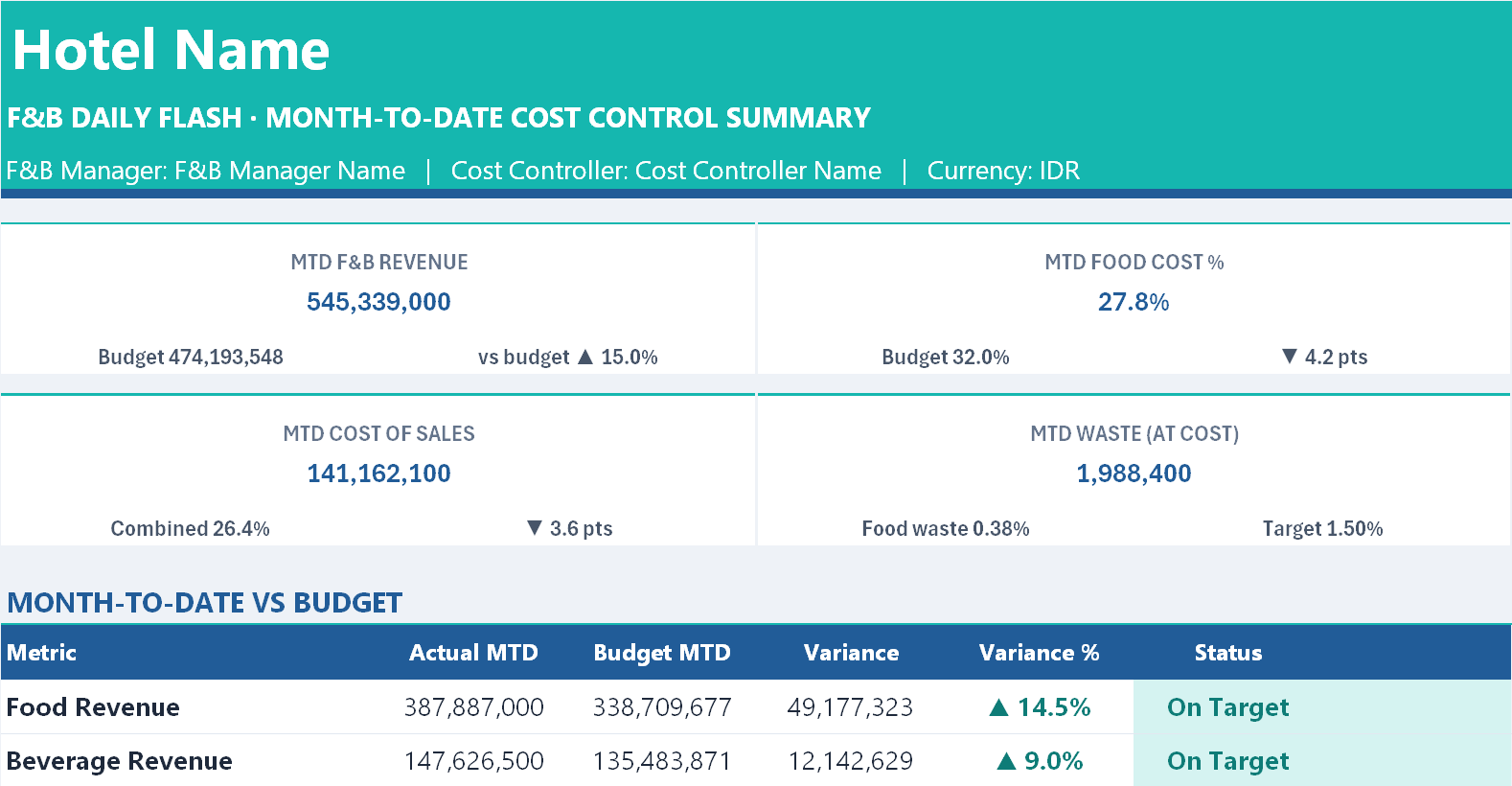
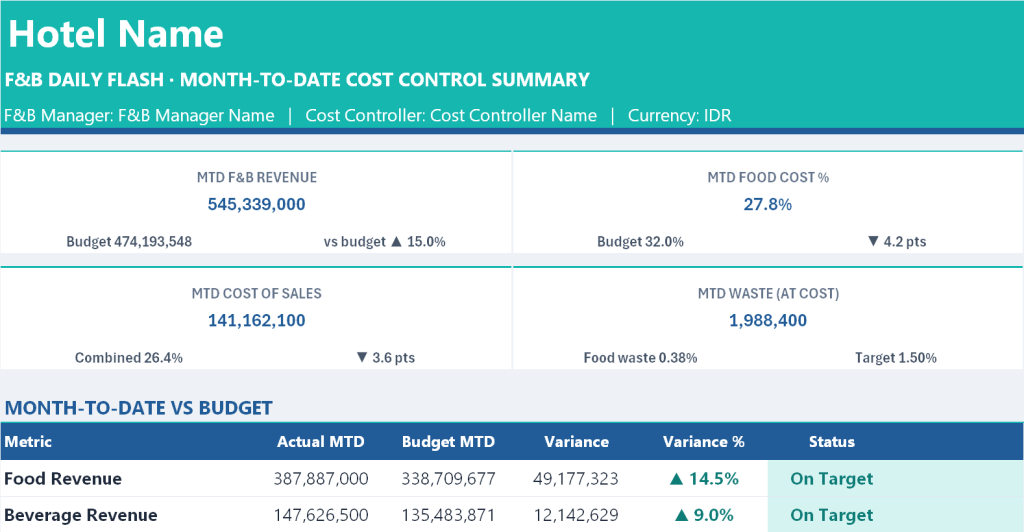
- Eight headline cards covering month to date F&B revenue, food cost percentage, beverage cost percentage, covers, total cost of sales, waste at cost, direct purchases, and an overall cost status.
- A header reporting the number of days entered against days in the month, and the last day reported.
- A Month to Date versus Budget panel covering ten lines, namely food revenue, beverage revenue, other revenue, total revenue, covers, average check, food cost percentage, beverage cost percentage, combined cost percentage and food waste percentage, each with actual, budget, variance, variance percentage and a status marker.
- An Outlet Performance panel showing covers, revenue, average check, revenue mix and covers mix for all six outlets, with a reconciliation line confirming that outlet revenue agrees with total revenue.
- Two charts, one plotting daily cost percentage against budget, and one plotting daily food and beverage revenue.
- A thirty one day log showing every day with its date, reporting status, covers, revenue, net costs, cost percentages, waste, purchases and a date check, closing with a month to date total row.
2. Setup sheet, configured once per month
- Property and period settings covering hotel name, report month, days in month calculated automatically, currency label, F&B Manager and Cost Controller names.
- Monthly budgets for food revenue, beverage revenue and covers, with daily budgets derived automatically.
- Cost targets covering food cost percentage, beverage cost percentage, a watch band in percentage points, and a waste target as a percentage of food revenue.
- Six outlet names, editable to match the property, with sample entries covering all day dining, lobby lounge and bar, in room dining, banquet and events, pool bar and grill, and minibar.
- Dropdown lists for category and six waste reasons, namely spoilage, overproduction, expired, breakage, plate return and preparation loss.
3. Daily sheets, 01 to 31
Each of the thirty one identical sheets carries five sections plus four headline cards:
- Headline cards for total F&B revenue, food cost percentage, beverage cost percentage and covers with average check, each showing the comparison against budget.
- Section 1, Revenue by Outlet. Covers, food revenue, beverage revenue and other revenue entered per outlet, with total revenue, average check, food per cover, beverage per cover, revenue mix and covers mix calculated, plus a daily budget row and variance.
- Section 2, Cost of Sales. The full calculation across eight lines, each split between food and beverage, with direct purchases pulled automatically from Section 3. It produces net cost of sales, cost percentage, budget cost percentage, variance, the over or under budget amount in currency, a status marker, cost per cover, and a transfer check confirming that food transfers out equal beverage transfers in and the reverse.
- Section 3, Direct Purchases Log. Twenty lines recording item, category, supplier, quantity, unit, unit cost, amount, invoice number, receiver, outlet and remarks, with a total split between food and beverage and a warning if any line is left uncategorised and therefore excluded from cost.
- Section 4, Waste and Spoilage Log. Twelve lines recording item, category, outlet, quantity, unit, unit cost, value, reason, recorder and remarks, with total waste, food waste as a percentage of food revenue, the target, and a status marker.
- Section 5, Manager’s Remarks and Actions, for the causes of variance and the actions agreed.
- A business date field with a sheet check confirming that the date entered belongs to that sheet number and to the report month.
4. Template, Compile, How to Use and Copyright
A hidden master copy of a day sheet for restoring a damaged one, a compilation engine that gathers figures from all thirty one days, a seven part user guide covering the workbook map, colour code, start of month setup, the daily routine, how to read the Summary, the key formulas and troubleshooting, and an ownership notice.
What you gain
- Food and beverage cost known daily, while it can still be corrected.
- A cost figure calculated the way Finance calculates it, so the daily flash and the month end report agree.
- A single daily report to the General Manager, produced from figures the Cost Controller can verify line by line.
- Direct purchases and waste captured at source, with invoice numbers, receivers and reasons recorded.
- Transfers between kitchen and bar reconciled automatically.
- Outlet level visibility on covers, average check and revenue mix.
- A fair mid month budget comparison, scaled to days actually reported.
- A complete month in one file, ready to archive and compare.
Owner: Oka Witantra
© 2026 Oka Witantra. All rights reserved.
Website: www.okawitantra.com
This document, including its design, layout, wording, structure and documentation, is the intellectual property of Oka Witantra. The downloader is granted a single user licence to use and adapt this document for the internal operation of their own property or organisation. Reproduction, redistribution, resale, sublicensing or publication of this document, in whole or in part, is not permitted without prior written permission from the author.
All names, codes and figures shown in this document are sample data for illustration only.
Download link:
F&B Daily Flash Cost Control